
If you receive a notification in the tool stating that your installed Claris FileMaker version is outdated or will soon no longer be supported by our servers, it is necessary to switch to the latest version of Claris FileMaker.
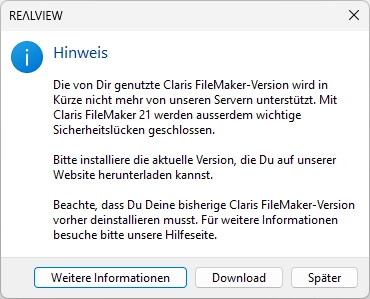
Important Notice
Unfortunately, Claris FileMaker does not allow a direct version upgrade. This means that updating from an older version directly to the latest version of Claris FileMaker is not possible without additional steps. The old Claris FileMaker version must first be completely uninstalled before the new version can be installed.
Please note that this process must be carried out directly on your device and cannot be performed by REΛLVIEW.
If the installation/uninstallation is handled by your IT department, they are welcome to contact our support team (support@realview.ch) for information regarding unattended installation (silent installation).
Uninstallation
Here’s how to uninstall your currently installed Claris FileMaker version. You can either do this yourself if you have administrator permissions, or your IT department can assist you.
Windows:
- Open the Control Panel
- Click "Programs and Features"
- Search for "FileMaker" in the list
- Select the program and click "Uninstall"
- Follow the on-screen instructions
- Open Finder
- Go to Applications
- Locate FileMaker
- Drag the application to the Trash
- Empty the Trash afterwards
Installation
Installing the new version
- Visit our website: https://realview.ch/download/
- Download the latest version of Claris FileMaker
- Start the installation and follow the instructions
If you require assistance during the uninstallation or installation process, our support team will be happy to help.