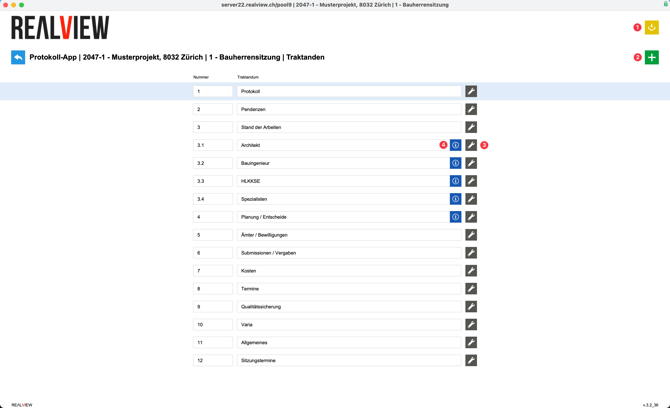
If agenda templates are stored in the admin menu, they can be imported using the yellow icon (1). Otherwise, you can also create the agenda items manually using the green plus sign (2). The agenda items are numbered automatically, but you can also customize the numbering or use sub-agenda items (1.1, 1.2, etc.).
With the wrench icon (3) , you can set whether the agenda item should appear on the cover page of the PDF or be hidden. By default, each agenda item is displayed on the PDF. You also have the option of deleting the agenda item here. Please note: deleting an agenda item also deletes all text entries contained therein - however, pending items from previous meetings are not deleted.
If an agenda item is added later, it will not automatically appear in the Text section. The agenda item can be added to the text via the info icon (4). It is also possible to add it in the text.