
To access the host, an internet connection must be ensured. If an internet connection is available, you can check with your internal IT department whether the following ports and IP addresses are open.
Ports/IPs: For our tool, TCP/IP port 5003 must be opened in the firewall. The following ports must also be enabled: HTTP 80, HTTPS 443. It is also important that TLS Deep Inspection is disabled for the servers. If required, here are the IP addresses of our servers:
| IP-Adresse | Hostname |
| 198.21.4.171 | mailing.realview.ch |
| 185.90.37.93 | server.realview.ch |
| 185.90.37.95 | server11.realview.ch |
| 185.90.37.154 | server14.realview.ch |
| 185.90.37.106 | server15.realview.ch |
| 185.90.37.58 | server16.realview.ch |
| 185.90.37.59 | server17.realview.ch |
| 185.90.37.69 | server19.realview.ch |
| 185.90.37.182 | server22.realview.ch |
| 185.90.37.153 | server23.realview.ch |
| 185.90.37.9 | server24.realview.ch |
| 185.90.37.15 | server25.realview.ch |
| 51.116.199.234 | server26.realview.ch |
| 185.90.37.96 | server27.realview.ch |
| 185.90.37.28 | server28.realview.ch |
| 185.90.37.39 | server29.realview.ch |
If there are certificate issues, one option would be to allow the full range of REALVIEW servers through the firewall. To do this, `185.90.37.0/24` must be enabled.
Important – additional internet access required for the initial installation
The ports/IPs listed above are sufficient for the ongoing operation of REALVIEW, but not necessarily for the initial installation of Claris FileMaker Pro itself. During installation, the installer automatically checks whether the required Microsoft components, including Visual C++ Redistributable and .NET Framework, are already installed and downloads them automatically if necessary. This requires general internet access, not just the REALVIEW ports listed above.
In a network that is strictly restricted to the REALVIEW servers, the installation may therefore fail with an error message such as mfc140u.dll not found, even though nothing is being blocked in the REALVIEW connection itself. The easiest way to avoid this is to manually install the Microsoft Visual C++ 2015–2022 Redistributable (x64) in advance. Download it from Microsoft: `vc_redist.x64.exe`. Further details can be found in the article Installation REALVIEW Software Distribution IT, Ports.
Enable TCP/IP Port (5003) locally
The outgoing TCP/IP Port 5003 may also need to be enabled locally for communication between the computer and FileMaker.
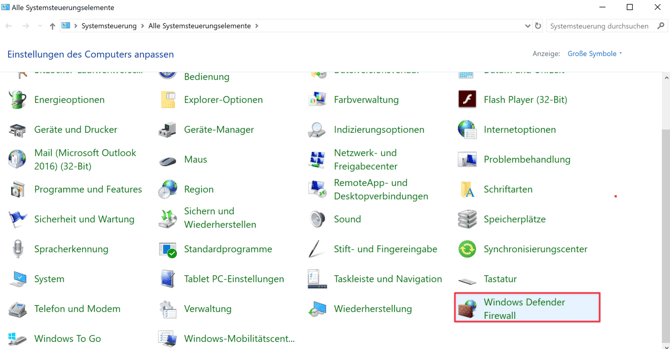
To do this, open the Windows Defender Firewall settings via the Control Panel.
The advanced settings can then be opened via the side menu. Under Outbound Rules, a new rule can now be created for TCP port 5003.