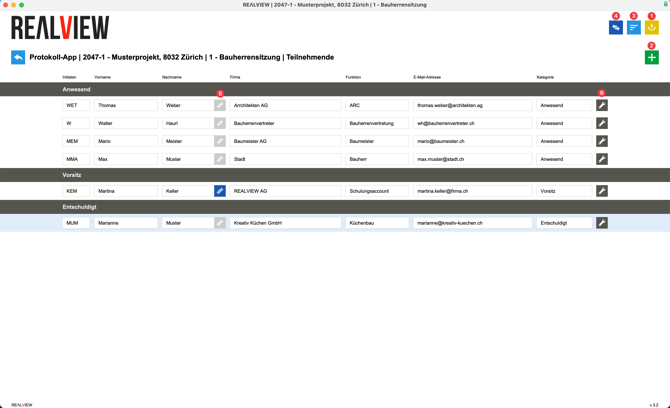
Participants can be imported using the yellow icon (1). If you also use construction management, you can import participants from there as well. You can also import participants from existing logs, where all participants who have already been used in a log are displayed.
You can also add participants using the green plus sign (2). You can enter the email address there. Several participants can be added at the same time; to do this, the email addresses must be listed on separate lines.
The default sorting is by company / last name / first name. The sorting can be adjusted using the sort icon (3). Please note: Participants are only sorted within categories. It is not possible to sort the categories.
To change the category for several people at once, select the people and the category using the dark blue icon (4).
Properties such as initials, first name, last name, company, position, email address, and category can be adjusted directly in the fields.
Signatures (5) can also be added for people, which will appear at the end of the minutes.
Personal signatures and the function must be activated in the admin menu under Participants by a superuser.
The wrench icon (6) can be used to delete a person from this log. Assigned text entries lose their assignment to this person.